Important: this article is intended for Endalia users with a Collaborator profile.
In this section, you can obtain the data for the surveys requested to be completed by the INE.
Survey generation
- Inside the hub Analysis, click on Surveys > INE Surveys
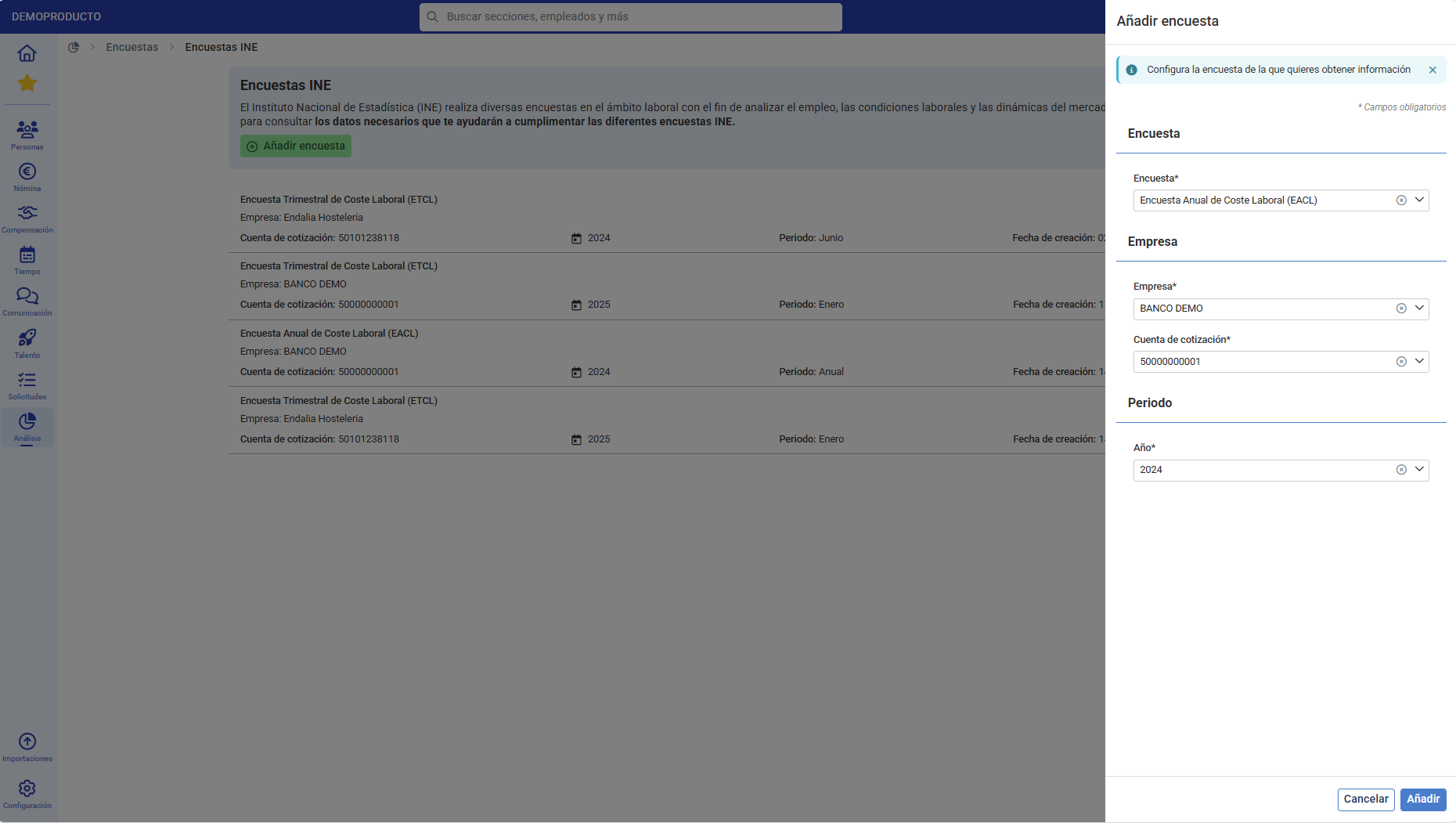
- You can see the surveys generated previously and add a new one.
- When adding a survey, you must provide some data:
- Type of survey you want to generate
- Annual Labor Cost Survey
- Quarterly Labor Cost Survey
- Company
- Contribution account
- Period
- Type of survey you want to generate
- Once the data is filled in, click Add.
- The process will generate the requested survey and it will appear on the main survey screen as well as the Activity Log.
- Click on the "eye" icon to view the data generated in the survey.
- You can view and copy each of the survey data to transfer it to the INE application.
IMPORTANT
- If you have not contracted a module of the application from which data is needed for the survey, the field will be shown with a dash. (-)
- In the Annual Labor Cost Survey, we will inform you in each section where we draw the data from, whether at the company or CCC level, so you can indicate it in the survey.
Was this article helpful?
That’s Great!
Thank you for your feedback
Sorry! We couldn't be helpful
Thank you for your feedback
Feedback sent
We appreciate your effort and will try to fix the article