Important: this article is intended for Endalia HR users with a Colaborador profile.
For all types of inquiries and to keep salary information organized, this option of Endalia's software is very useful. Curious? Pay attention to these tips we offer you.
In this article:
View and download my payroll documents
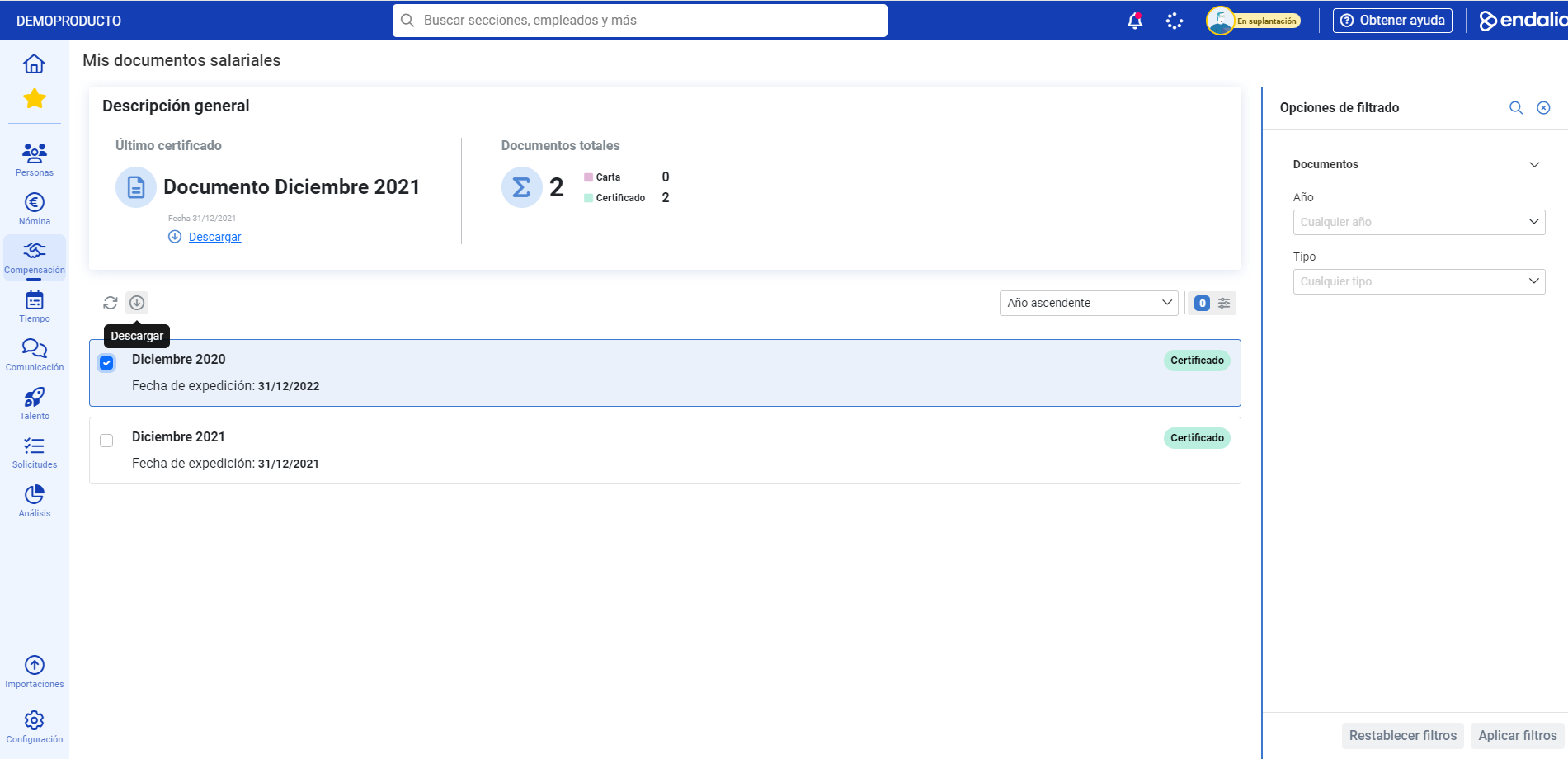
- Go to the hub Compensation and Benefits and, from there, go to Compensation > My salary information > My salary documents
- Now, you can view the different documents related to your work in the company, as well as their categorization (letter, certificate, etc.). To access its consultation, just click on one or several documents at once and click on the Download button, which you will find on the toolbar. Remember that you can use the filters located on the right side of the screen to narrow your preferences, and that the documents will be downloaded, in .pdf format, in the folder you have set by default on your computer to house them. In case of downloading several at once, a compressed file in .zip format will be created:

Additionally, you have the following related article at your disposal:
and a glossary of useful terms, in this link.
Was this article helpful?
That’s Great!
Thank you for your feedback
Sorry! We couldn't be helpful
Thank you for your feedback
Feedback sent
We appreciate your effort and will try to fix the article