Important: this article is aimed at users of Endalia HR with an Administrator profile.
It will allow you to access a centralized list of pending questionnaires (that is, in "not started" or "started" status) and historical ones (or "finished").
In the Talent hub, go to the Training > Employee Training > Questionnaires module.
In the next level, called Questionnaires, you have a list of them with the following information available within each one:
- Name of the training action
- Employee linked to the questionnaire (in "my team", the evaluation and efficiency questionnaires of employees which you have visibility over, according to permissions, and only in "read-only" mode)
- Type of questionnaire
- Start and end dates to respond
- Its status.
Click the View button located on each questionnaire to access additional information. 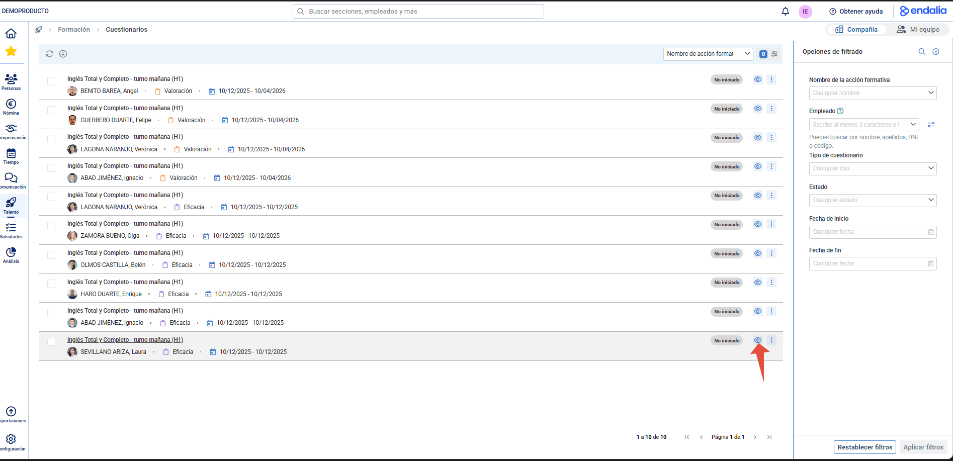
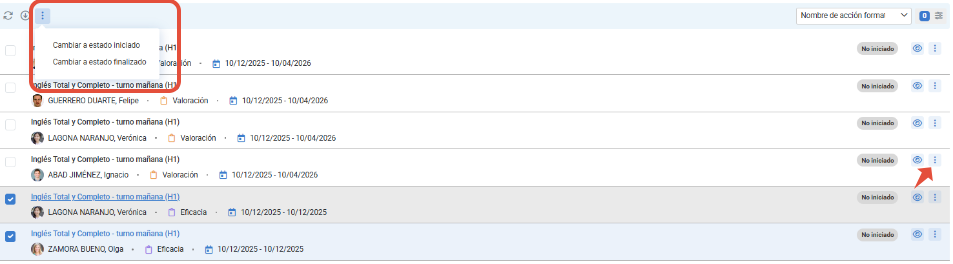
You can change its status using the button with 3 dots inside each questionnaire, or in bulk by selecting them and using the top bar.
Here is another related article you can consult:
Was this article helpful?
That’s Great!
Thank you for your feedback
Sorry! We couldn't be helpful
Thank you for your feedback
Feedback sent
We appreciate your effort and will try to fix the article