Important: this article targets Endalia HR users with an Administrator profile.
You can duplicate existing training actions to quickly create new editions. This functionality is ideal when you want to repeat training with different dates, shifts, schedules, or locations, saving time by not having to manually complete all information.
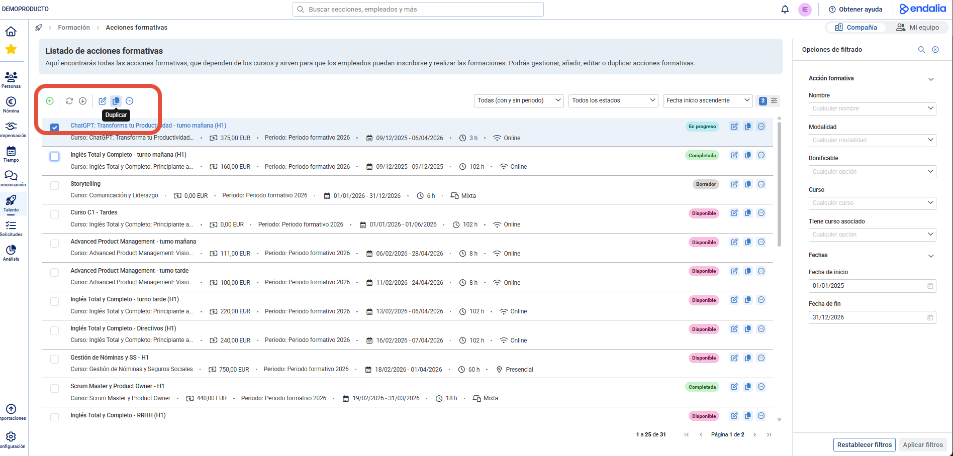
Within the Talent hub, go to the Training > Employee Training > Training Actions. Select the training action you want to duplicate and look for the "Duplicate" button.
You can include the original materials (Word documents, Excel spreadsheets, presentations, etc.) if you check the dedicated box:
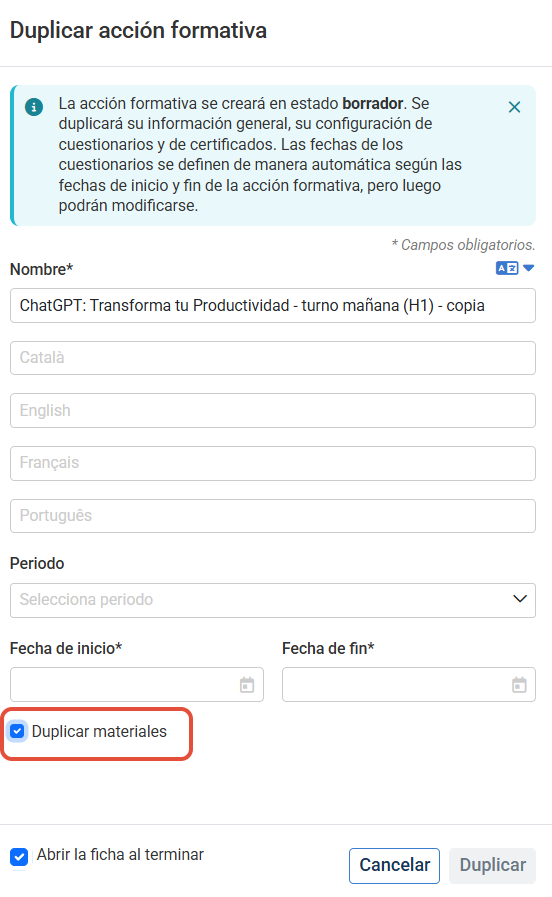
Open the training action record to complete it. The training action will be created in draft status. Its general information, questionnaire, and certificate settings will be duplicated. The dates for the questionnaires are automatically set based on the start and end dates of the training action but can be modified later.
Note: The duplicated training action will always be saved as Draft. By default, sessions and participants from the original action will not be duplicated.
Still have questions? Consult the following related articles:
Furthermore, you can view our glossary, available at this link.
Was this article helpful?
That’s Great!
Thank you for your feedback
Sorry! We couldn't be helpful
Thank you for your feedback
Feedback sent
We appreciate your effort and will try to fix the article