The competency profile shows the evaluated competencies of an employee and how they fit the requirements for their position.
From this view you can consult:
- The active competencies of the current position.
- Competencies assessed in previous positions.
- The employee's average gap.
- The visual distribution of competencies.
- The evolution of each competency by period.
- Access the competency profile
- What information does it show
- Competencies of the current position
- Competencies of previous positions
Access the competency profile
Path: People > Employees > [Select employee] > Positions and profile > Competency profile
Also from:
- Employee development > View employee profile
- Competency consolidation > Direct access from grid
What information does it show
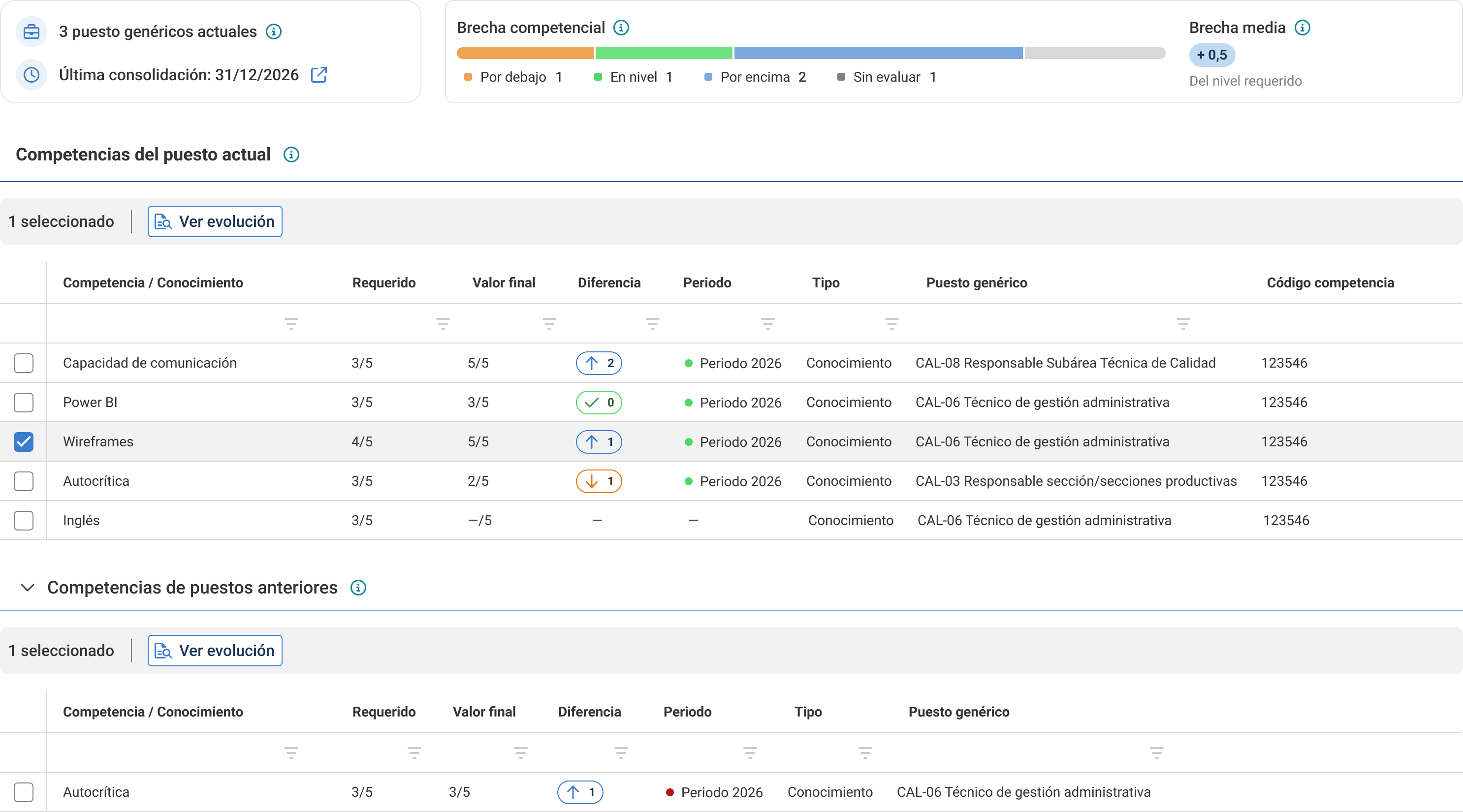
Top summary
At the top of the profile you will find a summary with key information.
Current generic positions:
- Number of generic positions the employee currently has
- Example: "3 current generic positions"
- Reflects the organizational structure at the current moment
Last consolidation:
- Date of the last competency consolidation
- Example: "Last consolidation 31/12/2026"
- Indicates when the last official evaluation was carried out
Visual distribution bar:
Shows how many employee competencies are:
- Below the required level (color code)
- At the required level
- Above the required level
- Not evaluated
Example: "1 below / 1 at level / 2 above / 1 not evaluated"
This bar lets you know the overall status at a glance without reviewing each row.
Average gap:
The average gap indicates the mean difference between the employee's evaluated level and the level required for their position.
Examples
- "+0.5" = the employee is half a point above the required on average
- "-1.2" = the employee is 1.2 points below the required on average
Visual distribution
- Green: positive gap (above)
- Red: negative gap (below)
- Blue: at level
- Gray: Not evaluated
This allows you to understand the global status of the profile without reviewing each competency one by one.
Competencies of the current position
The table shows the competencies required by the employee's current position.
It appears expanded by default and lets you quickly review which competencies are:
- Below the required level.
- At the required level.
- Above the required level.
- Not evaluated.
The competencies are prioritized by those with the largest negative gap, to make it easier to identify development areas.
The competencies of the current position that have not yet been evaluated are also shown, but appear with the status Not evaluated.
Competency:
- Competency name
- Competency area in parentheses
- Example: "Self-criticism (Influence)"
Evaluated level:
- Score the employee received in the last consolidation
- Scale 1-5 or N/A
Required level:
- Minimum score required for the position
- Defined in the generic position profile
Gap:
- Difference: Evaluated level - Required level
- Example: Evaluated 2, Required 3 → Gap -1
- Color code:
- Red: negative gap (below)
- Green: positive gap (above)
- Gray: gap = 0 (at level)
View evolution (icon or link in each row): Shows the history of that competency over different periods
View historical evolution of a competency
Each competency has a "View evolution" button (previously it was hidden with double click). When you click "View evolution" a modal opens showing:
The evolution shows:
- Competency period.
- Level achieved.
- Required level.
- Gap.
- Consolidation date.
- Evaluator.
This information helps understand if the employee has improved, remained stable, or worsened in a specific competency.
Real example: "Select 'Wireframes' > click 'View evolution'. See that they have been level 5 for 3 periods, always above."
What it is for:
- Feedback conversations: "You have maintained level 5 for 3 years, excellent"
- Stagnation detection: "You've been at level 2 for 2 years when 3 is required"
- Development plans: prioritize competencies that do not improve
Competencies of previous positions
If the employee has held other positions in the company, this section shows the competencies that were assessed in those historical positions.
- Career context: "They were very good at commercial management before moving to product"
- Identify hidden talent: strong competencies no longer used in the current position
- Internal mobility decisions
Note: The competency profile reflects the latest official consolidation. If you have just evaluated someone but have not consolidated, the changes will not appear here until after consolidation.
Was this article helpful?
That’s Great!
Thank you for your feedback
Sorry! We couldn't be helpful
Thank you for your feedback
Feedback sent
We appreciate your effort and will try to fix the article