Important: this article is aimed at Endalia HR users with an Administrator profile.
Carrying out multiple tasks is part of the day-to-day in a company, as is keeping constant records and supervision of everything that happens in a given environment. Want to know more about it? Then, don't miss a single detail.
Here you will find:
Monitoring
- Within the hub Time Management, click on Vacation and absences > Absence Monitoring
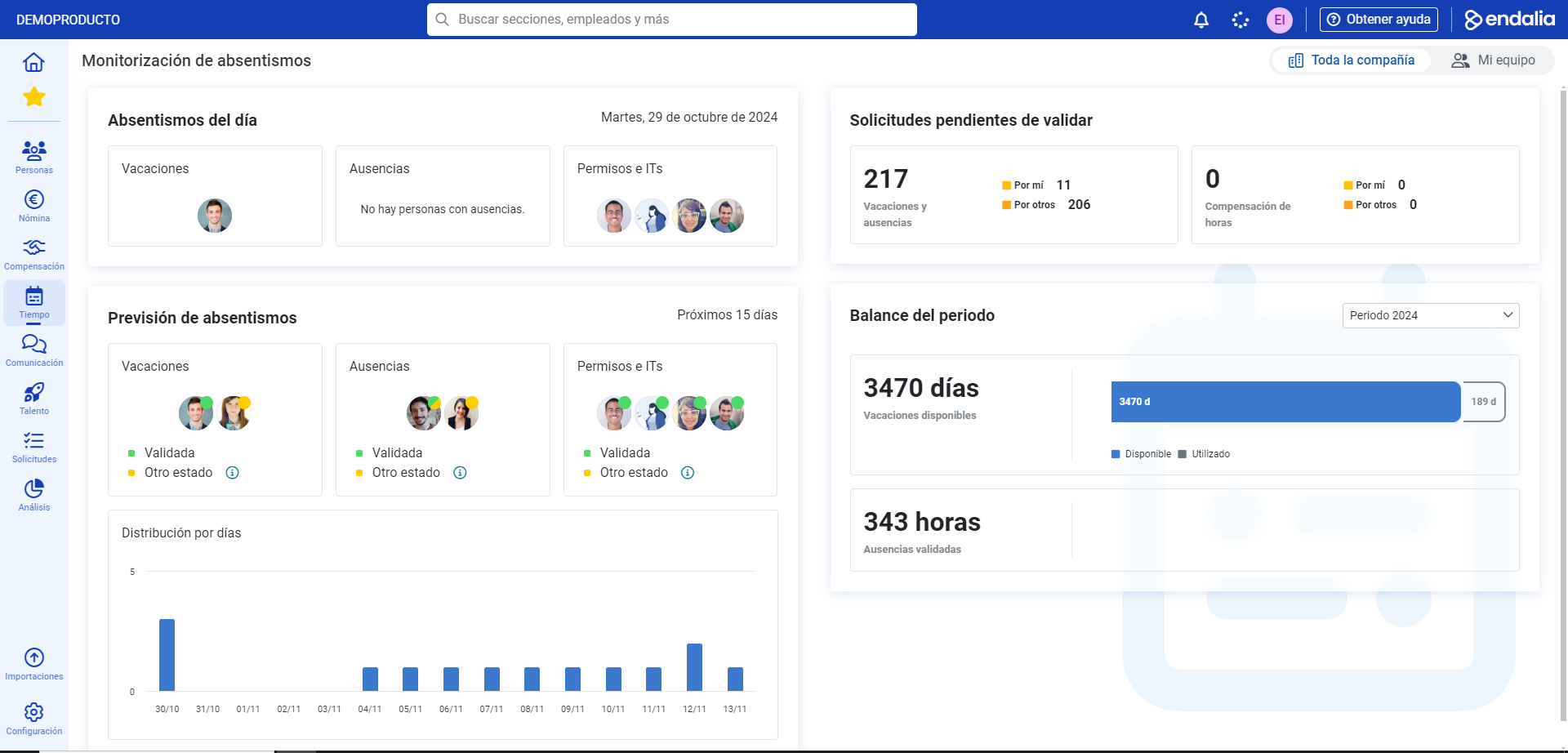
- On this screen you can control, at a glance, everything related to employee vacations and absences, as well as total figures on pending requests, absences, and period balances. Currently, the following subsections are displayed on this screen:
- Today's absences: here you can monitor, in one go, various parameters related to this functionality, such as which people have vacations, absences, leave, or temporary disabilities today. If you hover over a person's avatar, you will receive additional information and if you click on it, the system will redirect you to a tracking calendar.
- Absence Forecast: same concept as the previous paragraph, although, in this case, it refers to employees who will soon be enjoying/having vacations, absences, leave, etc.
- Pending requests for validation: it expresses, in total numbers, the requests for vacations and absences, and compensations for hours that have not yet been approved through the appropriate channels; similarly, you can click on each subsection to see detailed information and/or edit using the buttons always available in the toolbar.
- Period Balance: to consult absolute data (for the entire company) on validated vacations and absences. Again, as in previous occasions, click on numbers or sections to consult detailed information and carry out new actions:
Process Video
Here is a brief summary of the module's functionality:
Still have questions? Here you have other reference articles:
If you have questions about the terms, check our glossary at this link.
Was this article helpful?
That’s Great!
Thank you for your feedback
Sorry! We couldn't be helpful
Thank you for your feedback
Feedback sent
We appreciate your effort and will try to fix the article