Important: Before managing users, you must configure Biostar. Consult related articles for more information. This article is aimed at Endalia HR users with an Administrator profile.
The access, time or attendance records in Biostar are not understandable without managing the users themselves, an active part in all processes. Do you want to know more about this functionality? Don't miss the following tips.
Here you will find:
Manage users in Biostar
- Inside the hub Configuration, click on the Time Registration > Biostar Users module
- Next, two tabs are presented; the first corresponds to Created Users, meaning people who appear in both Endalia and Biostar records, with their corresponding link. On the other hand, People without User refers to those employees who need to use Biostar's functionalities, so they must be assigned to this software. To do this, click on this last tab, select the user(s) from the list by checking their corresponding box, and click on the Link User button, found in the toolbar. Once the user(s) and their corresponding codes are chosen, click Link
- Lastly, in Time Management > Segment Registration, the list of them will be integrated. Click on the History button, in the toolbar, to access all available information on the matter:
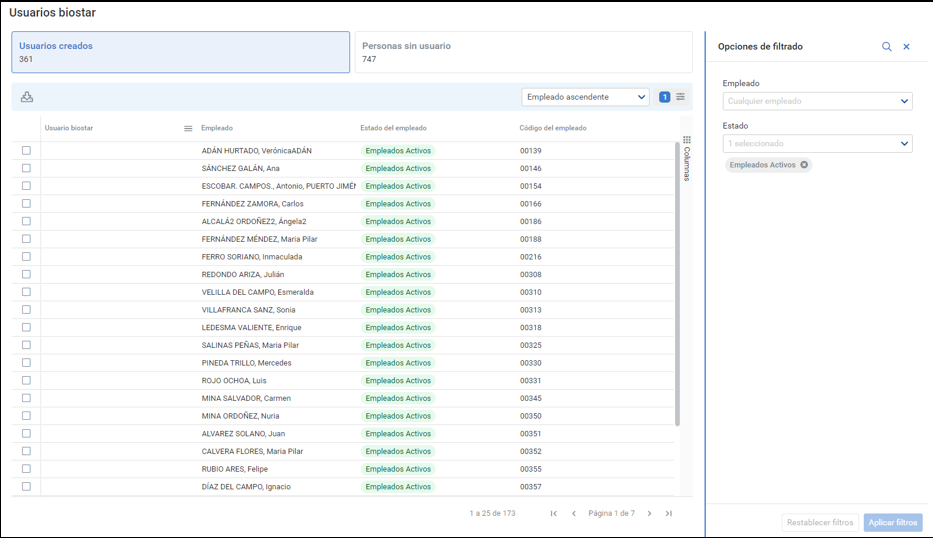
Note: In Configuration > Time Registration > Module Options > Registration Mode > Physical Devices (Biostar) > Edit, you have the option to Enable Automatic User Integration. If you decide to use it, the Biostar Users screen (see image above) will be merely informative, and it will not be possible to add new users or map Endalia-Biostar users. Only if it is deactivated, will you be able to use the functionalities described in step 2 of this guide.
Still have questions? Check out the following related articles:
Additionally, you can view our glossary, available at this link.
Was this article helpful?
That’s Great!
Thank you for your feedback
Sorry! We couldn't be helpful
Thank you for your feedback
Feedback sent
We appreciate your effort and will try to fix the article