Important: To be able to manage users, you must first configure Biostar. For more information, check the related articles.
This article is aimed at Endalia HR users with an Administrator profile.
Having a historical record of employee activity in case of a device integration failure is something every company needs, and the Endalia to Biostar dump assistant provides you with the information you need at all times.
Here you will find:
Reconstruction of records in Biostar
Within the hub Configuration, click on the module Time Register > Segment Register
On the screen presented, click on Recover Biostar segments, a button you will find on the toolbar.
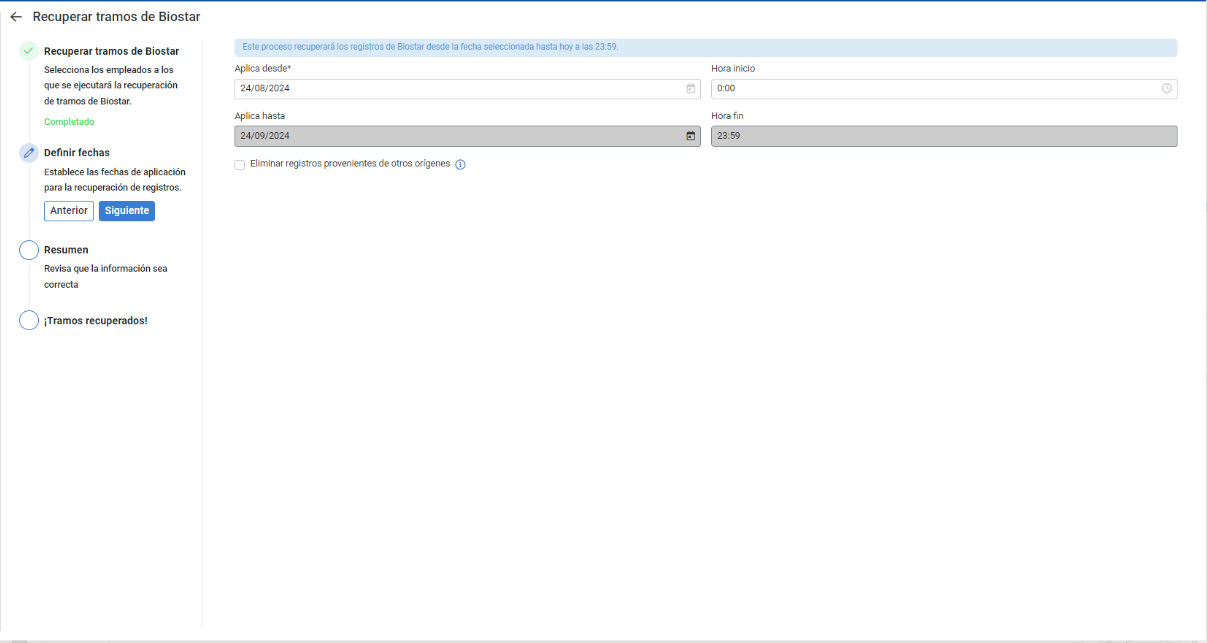
In the following modal window, a tunnelized process is available; in the first step, select the employees whose segments you want to recover, directly in the list or using the filters provided, and click Next. In the second step, choose the date range of the records you want to recover, then proceed to the next step, and finally, review your selection through the summary before clicking Recover. You now have the recovered segments from Biostar to Endalia available on the main screen:
Still have questions? Take a look at the following related articles:
Additionally, you can view our glossary, available at this link.
Was this article helpful?
That’s Great!
Thank you for your feedback
Sorry! We couldn't be helpful
Thank you for your feedback
Feedback sent
We appreciate your effort and will try to fix the article