Important: this article is aimed at Endalia HR users with Administrator profiles.
Managing employee salaries is as important as keeping a record of it, with its different variables. Follow these small tips to know, at all times, how to effectively use this module function.
In this article:
Monitor Employees
Within the hub Compensation and Benefits, go to Compensation > Salaries
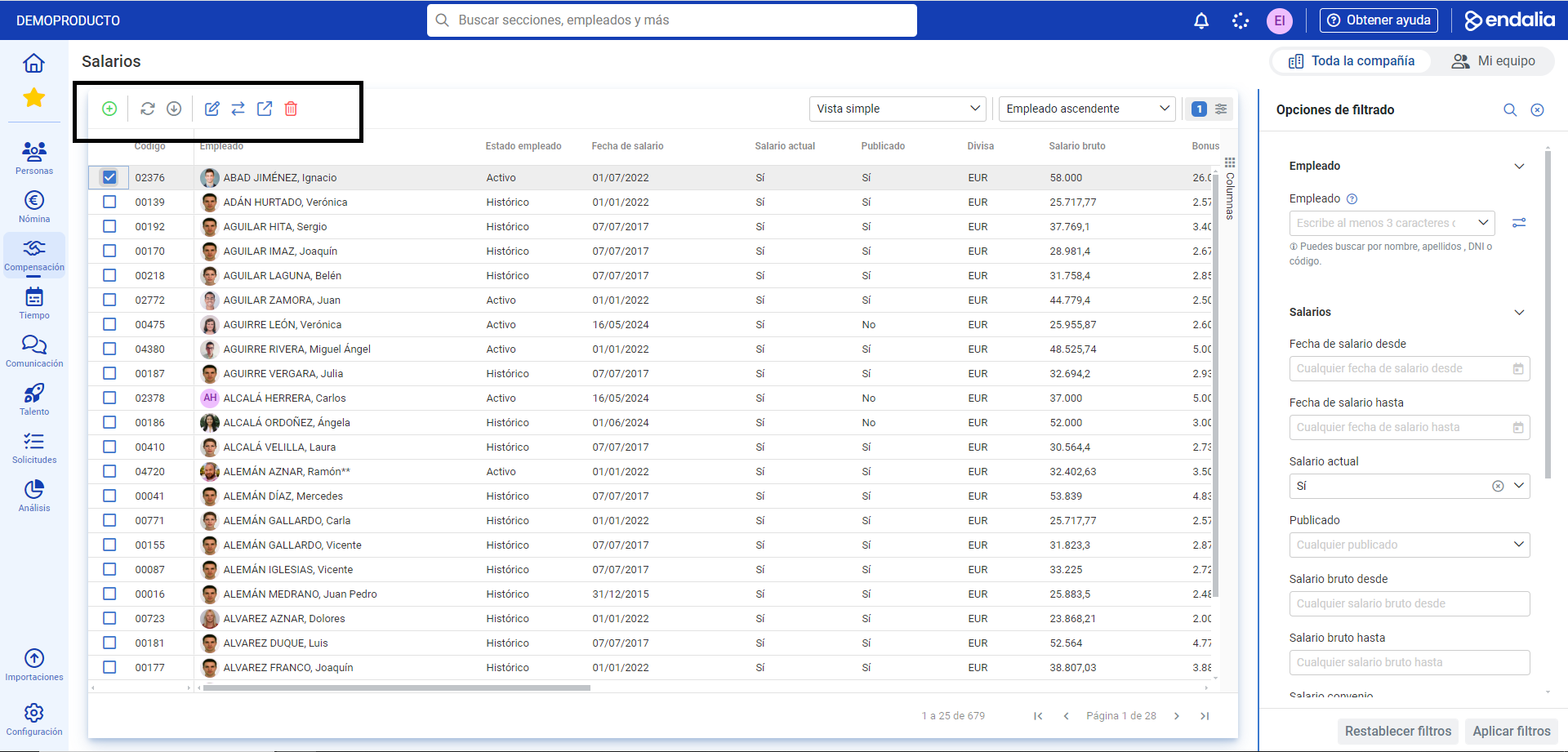
On the next screen, Salaries, you have a list of all employees, with their corresponding salaries, bonuses, and other relevant data.
To perform different actions, click on the box or the corresponding employee's name and then press the buttons on the toolbar:
Add: allows you to add new employees to the list and include salaries and observations.
Edit: to make changes to both salaries and the various related concepts.
Change: with this button, you can publish or hide employee salaries.
Open Record: to have all the information related not only to salary but also to other employee concepts at hand.
Delete: to remove the aforementioned information from the list.
Process Video
Not sure? We'll explain it here, very briefly:
In addition, the following related articles are available to you:
Still have questions? Take a look at our glossary on this link.
Was this article helpful?
That’s Great!
Thank you for your feedback
Sorry! We couldn't be helpful
Thank you for your feedback
Feedback sent
We appreciate your effort and will try to fix the article