This article is not available in Portuguese/Portugal, view it in Spanish
Important: this article is for Endalia HR users with an Administrator profile.
Another indispensable feature for any company, and a good way to manage it through our software. Pay attention to these brief tips to get the most out of this feature.
In this article:
Manage and edit salaries
Within the hub Compensation and Benefits, go to Compensation > Salaries
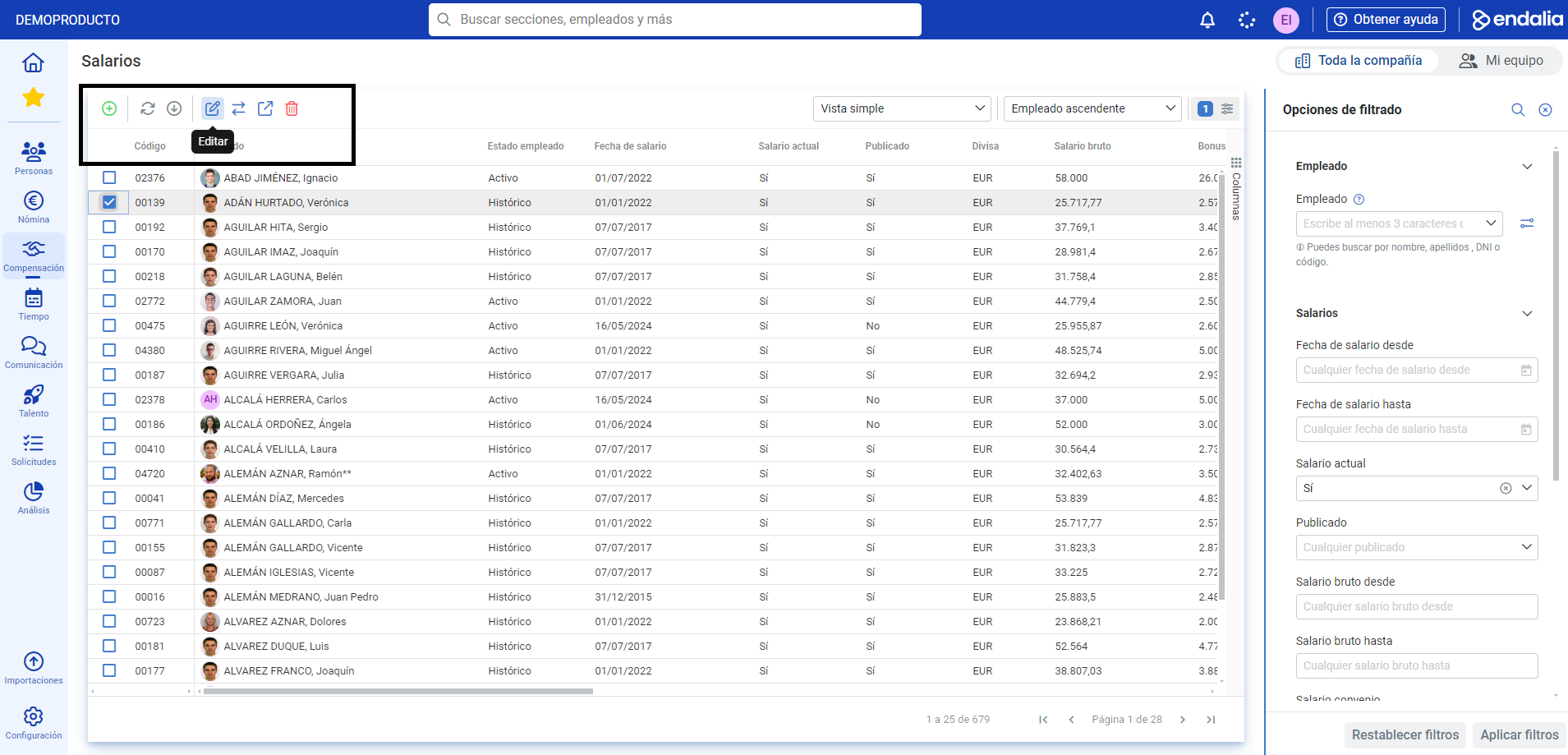
This new screen, Salaries, displays the employee remuneration list of the company. You can use filters, located on the right side, to specify your preferences.
To manage and edit salaries, click on the checkbox or the corresponding row of the employee/s and use the buttons on the toolbar (Edit, Publish, Delete, etc.). You can also add a salary using the Add button located on the toolbar, then complete the presented modal window:
Video of the process
Not sure about it? We explain it here, very briefly:
Additionally, you have the following related articles available:
Still uncertain? check out our glossary at this link.
Was this article helpful?
That’s Great!
Thank you for your feedback
Sorry! We couldn't be helpful
Thank you for your feedback
Feedback sent
We appreciate your effort and will try to fix the article