Important: this article is intended for Endalia HR users with a Collaborator profile.
When you enroll in a training action, the scheduled sessions are automatically recorded in your calendar so you can see when you need to attend and organize yourself better.
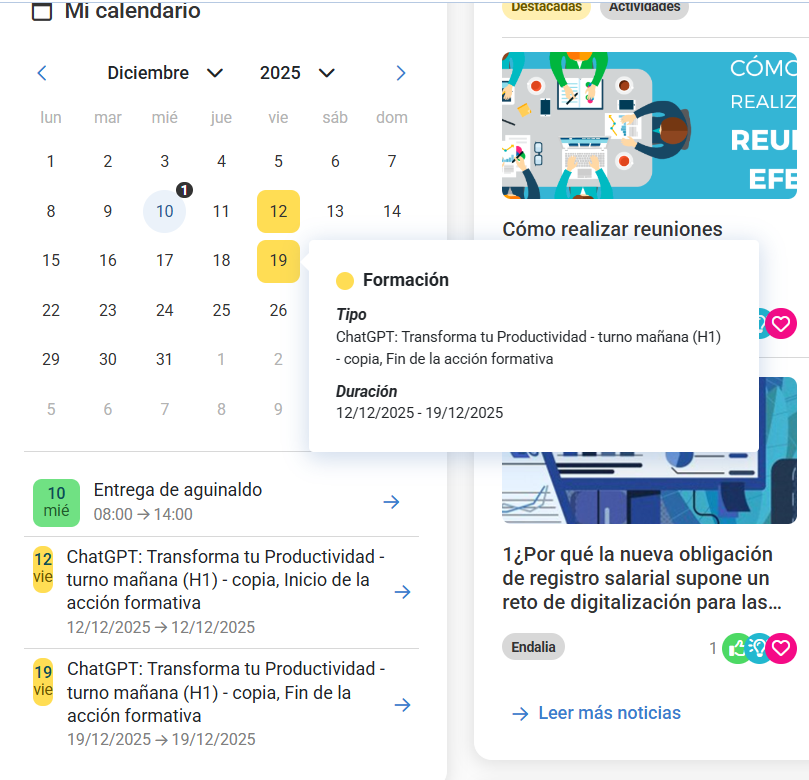
Go to the homepage and look for the calendar widget. The calendar displays your work commitments, including: -
- Vacations
- Permissions and absences
- Training sessions - What appears in the calendar are the individual sessions of the training actions, NOT the complete training action.
- Other work events
If the training action has created sessions, then all sessions will be scheduled in the calendar. If the training action does not have created sessions, then as many days as there are between the start and end dates of the training action will be scheduled (it will appear highlighted in yellow for as many consecutive days as affect the training action).
Once the action is marked as completed, it will no longer appear in the calendar.
Additionally, you can consult our glossary for more information, found in this link.
Was this article helpful?
That’s Great!
Thank you for your feedback
Sorry! We couldn't be helpful
Thank you for your feedback
Feedback sent
We appreciate your effort and will try to fix the article