The integration between Endalia and isEazy LMS enables your organization to manage training centrally, connecting both platforms so that your employees can access their courses directly and without hassle.
- Automatically synchronize active users from Endalia to isEazy.
- Allows direct access through Single Sign-On (SSO) - no additional credentials needed.
- Manage permissions from Endalia - control who can access the training.
What can I find in this article?
Access via SSO (Single Sign-On)
- What is SSO?
- How do collaborators access - Participants?
- How do collaborators access - Managers?
- What happens if an employee does not have permission?
Important limitation: Existing clients in isEazy
Benefits
For HR
- Centralized management: Manage users and permissions from a single place.
- Greater control: Activate or deactivate training access through role and permission management.
- Complete visibility: Always know who has access to the training platform.
For employees :
- Direct access: One click from Endalia to access all their courses.
- No additional passwords: No need to remember more credentials - access is automatic.
- Unified experience Everything from the same environment they already know.
Step-by-step configuration
Prerequisites
- Endalia: Have activated the integration with isEazy with us.
- isEazy: Connection data provided by isEazy
Access the configuration
- Configuration > Training > Module options
- Locate the section "Connection with isEazy"
- Enable connection data, and click the pencil button to enter connection data. A modal window will open where you need to complete:
| Field | Description | Example |
|---|---|---|
| Tenant URL | Address of your isEazy platform | https://tuempresa.iseazylms.com |
| Master API User | Admin user provided by isEazy | api@tuempresa.com |
| API Password | Password of the API user | •••••••••• |
| SSO Secret | Secret key for SSO authentication | abc123xyz... |
4. Click "Save", the integration will be activated
5. You will see the "Configured" status on the main screen
Permission management
Who can access isEazy?
Only users with the "Access to isEazy" permission activated can access the platform via SSO.
How to activate the permission
- Go to Configuration > General > Roles and permissions
- Select the role you want to give access to.
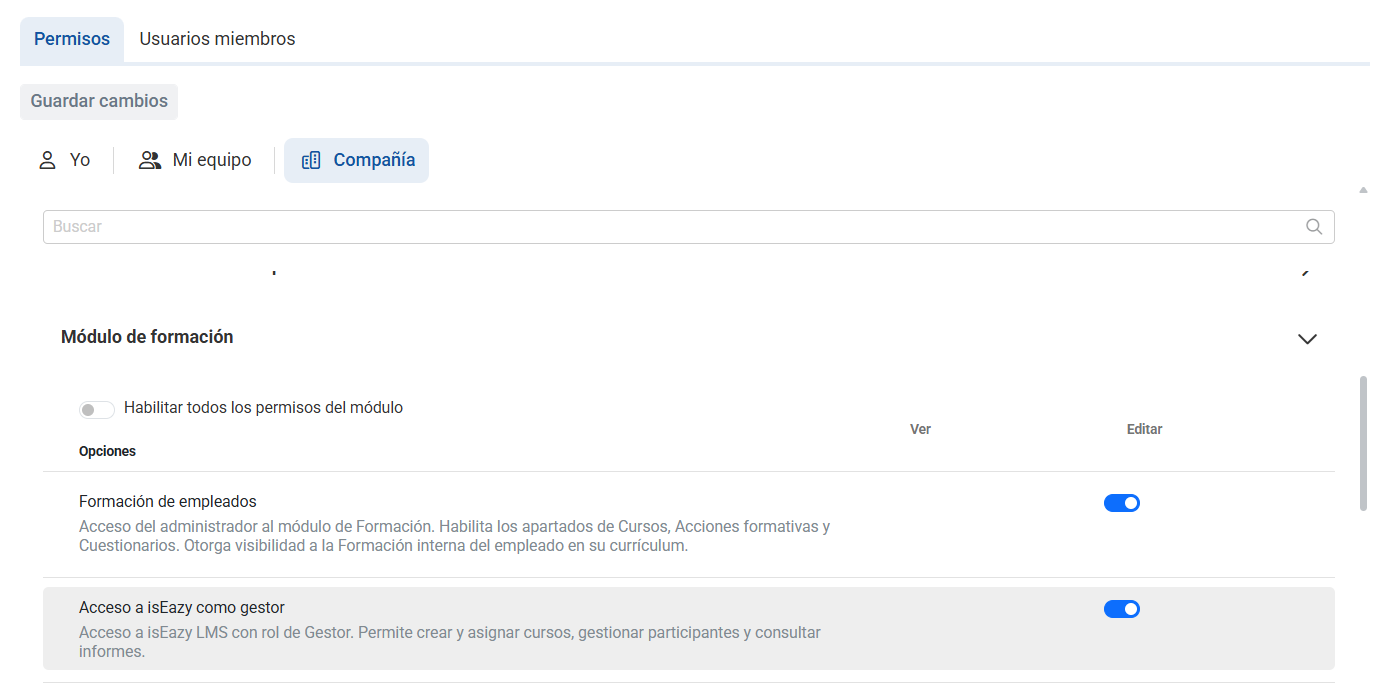
- In the Training section, activate the corresponding permission:
"Access to isEazy as manager" (company)
"Access to isEazy as participant" (Me)
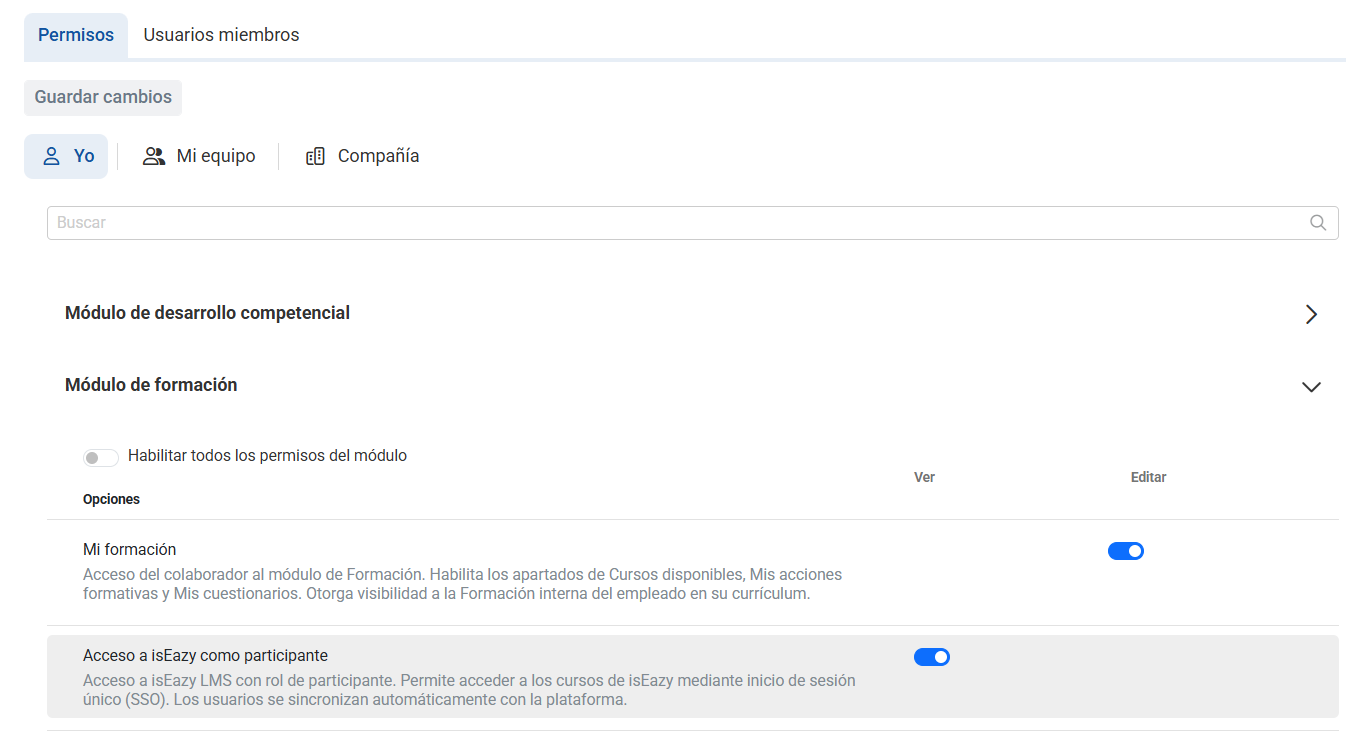
This section will only appear if you have the connection previously set up.
When is the permission synchronized?
- Synchronization occurs automatically every 24 hours
- You can also force an immediate synchronization from the "Sync now" button in isEazy configuration
How do I check if a user has the enabled permission?
- Go to Configuration > General > Users
- Search for the specific employee
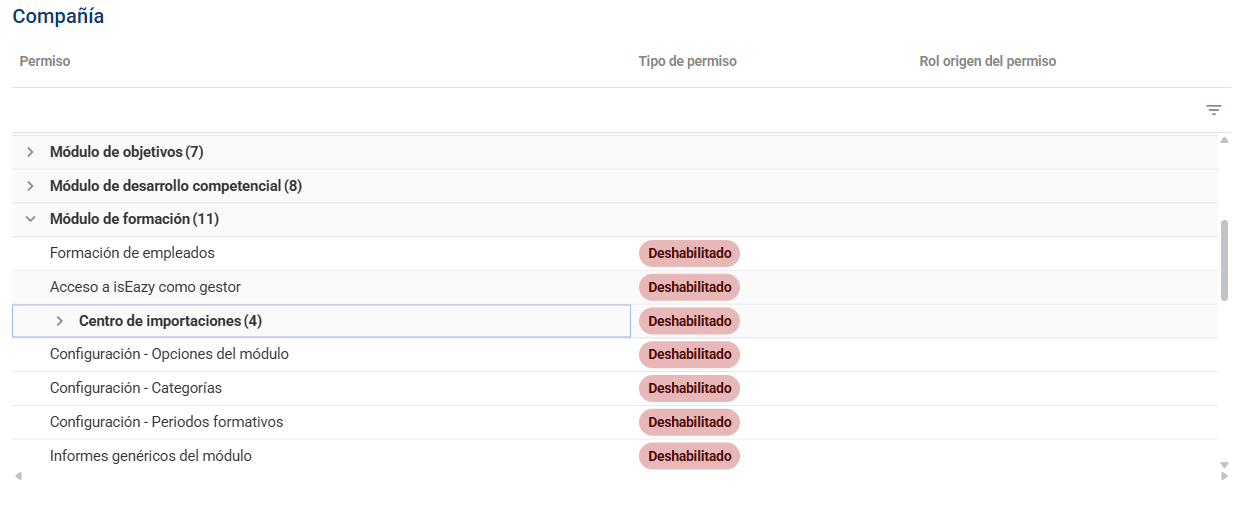
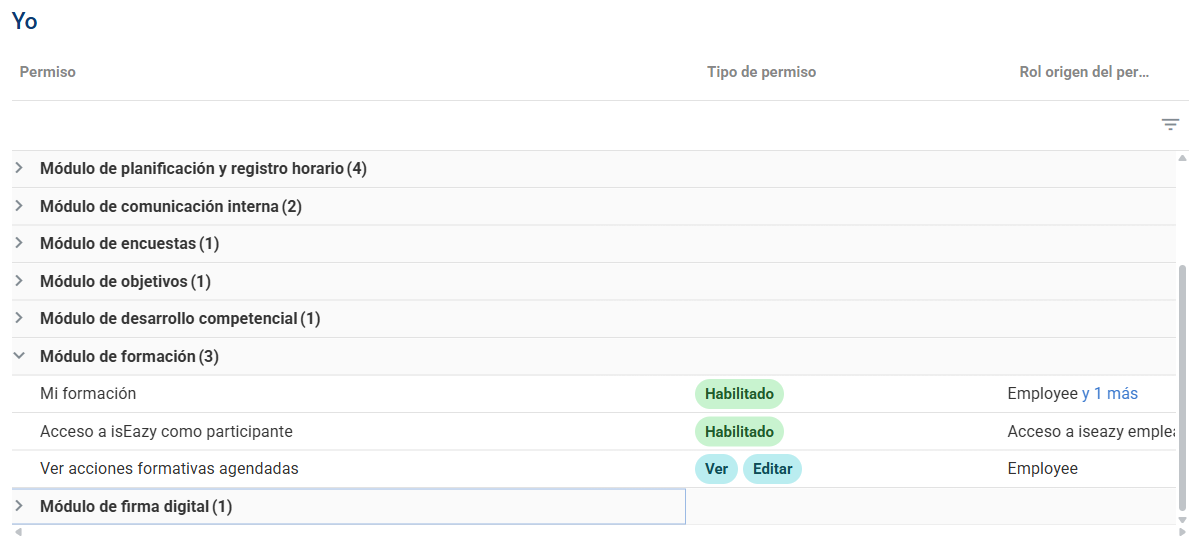
- In their file, section Roles and permissions
- Look for the corresponding permission and check the status.
"Access to isEazy as manager" (company)
"Access to isEazy as participant" (Me)
5. You can also manage the user's roles from this screen.
Access via SSO (Single Sign-On)
What is SSO?
SSO allows employees to directly access isEazy without entering a username and password, using their active Endalia session.
How do collaborators access - Participants
- The user logs into Endalia
- Navigate to Training > Available courses. If they have the permission activated, the "Access isEazy" button will appear in the upper right corner

- When clicking, isEazy opens in a new tab
- Enter automatically - no additional login required
How do collaborators access - Managers
- The user logs into Endalia
- Navigate to Employee training > Courses. If they have the permission activated, the "Access isEazy" button will appear in the upper right corner

- When clicking, isEazy opens in a new tab
- Enter automatically - no additional login required
What happens if an employee does not have permission?
If an employee does not have the permission activated, they simply won't see the button.
Important limitation: Existing clients in isEazy
Your organization was already using isEazy BEFORE contracting the integration with Endalia, and therefore you already have users created in isEazy with their own codes and data. isEazy uses a unique user code that cannot be repeated across environments. When Endalia tries to create users, it may happen:
- Duplicate error if the code already exists in another environment
- Duplicate users if the Endalia code is different from the isEazy code
Don't worry, our team will analyze your specific case and guide you through the process to integrate without complications.
Was this article helpful?
That’s Great!
Thank you for your feedback
Sorry! We couldn't be helpful
Thank you for your feedback
Feedback sent
We appreciate your effort and will try to fix the article