Important: this article is intended for Endalia users with an Administrator profile.
Sometimes it's necessary to update a position's name or code to better reflect its function, structure, or internal nomenclature. In Endalia, you can easily make this change directly from the position's record without needing to create a new version.
In this article
Modify the name or code of a position
Within the People and Position hub, access Positions > Organizational Structure.
Locate the position you wish to update and click on its row to open the position record.
At the top of the screen, within the Basic Data section, open the Modify Fields menu.
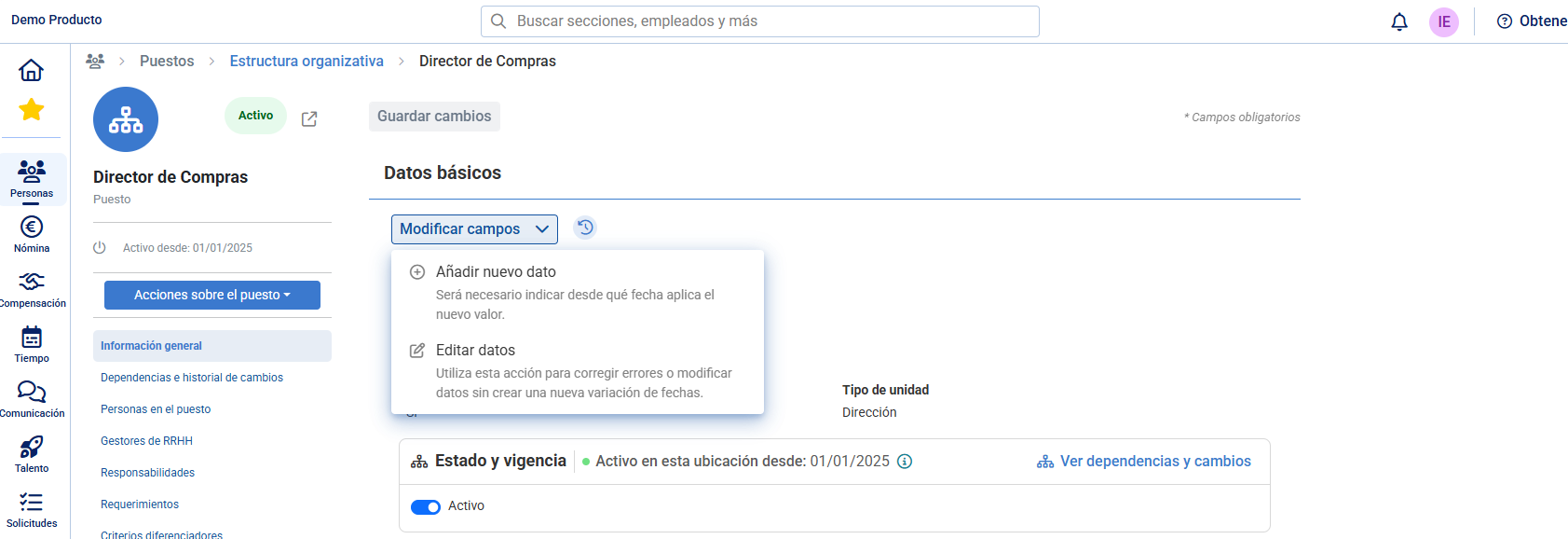
Select one of the two available options:
Add new data: if you want to register a change of name or code with a start date of variation, indicating when the new value applies. If you only change one of the two fields (name or code), the other will remain the same.
Edit data: if you only wish to correct or adjust the current field value (for example, a typographical error) without generating a new date variation.
Enter the new name or code of the position in the corresponding fields.
Click Save changes.
Note: if you change the name or code through Add new data, the system will retain the history of previous names/codes, allowing you to track the evolution of the position over time.
Related articles
Want to know more? Check the following related articles:
If you have questions about the terms, check out our glossary at this link.
Was this article helpful?
That’s Great!
Thank you for your feedback
Sorry! We couldn't be helpful
Thank you for your feedback
Feedback sent
We appreciate your effort and will try to fix the article