Important: this article is aimed at Endalia users with an Administrator profile.
Positions, like people, change over time. Learning to move them within the organizational structure is essential to accurately reflect hierarchical changes and keep the company's "who's who" updated.
Move positions in structure
Access the People and positions hub and go to Positions > Organizational structure.
In the structure view, locate the area, position, or department you wish to move.
Check its box or click directly on the corresponding row.
Next:
Press the More options button located in the toolbar.
Select the Move position to… option
Note: You can also perform this action from the position file, in Actions on the position.
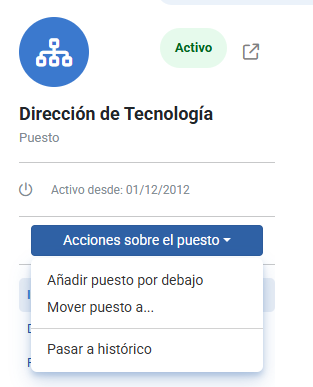
The Move position modal window will open, guiding you through the process.
Step 1: Basic Data
In the first phase, you can define what to do with the position's dependencies and set the start date of validity for the move.
You have two options:
Move also its descendant positions: the system will move the selected position along with its entire subordinate structure.
Move only the current position: only the chosen position will be moved, without affecting subordinate positions.
Also define the start date of validity, indicating when the new location within the structure will take effect.
Click Next to continue.
Step 2: New Location
In the second step, select the organizational unit or superior position where you wish to place the position (and its descendants, if applicable).
You can do this in two ways:
Use the search function to locate the destination unit.
Navigate the structure tree until you find the appropriate position.
After reviewing the information, click Move to complete the process.
Note: Be aware of certain limitations when moving positions in the organizational structure:
- A subordinate position with a higher type of organizational unit than the one it belongs to cannot be moved (for example, a department cannot be moved above a directorate or area, as these are hierarchically superior).
- A position can be moved if the type of organizational unit is the same (for example, moving a department under another).
Related articles
Want to know more? Check the following related articles:
If you have doubts about the terms, take a look at our glossary at this link.
Was this article helpful?
That’s Great!
Thank you for your feedback
Sorry! We couldn't be helpful
Thank you for your feedback
Feedback sent
We appreciate your effort and will try to fix the article