Important: This article is intended for Endalia users with an Administrator profile.
The contract tracking screen offers a tool to efficiently manage all aspects related to employee contracts. From this screen, you can monitor new hires, manage probation periods, control contract expirations, and perform key actions such as renewals, terminations, and contractual transformations, all from a single place.
Viewing the contracts
The contract tracking screen (People > Monitoring > Contract tracking) is designed to display employee contracts according to their current status. The visible states are:
Incorporation
End of Probation Period
Contract Expiration
If an employee is in two different states (for example, a pending incorporation and an end of probation period), the screen will show the duplicate record. However, if it's expiration and incorporation, the incorporation won't be shown until the previous contract has expired. This ensures that users can efficiently manage all aspects of the contract, regardless of how many states the employee is going through.
If an employee has a contract ending and another starting the next day, it will not appear in the contract tracking as it is considered a contract change and has already been managed.
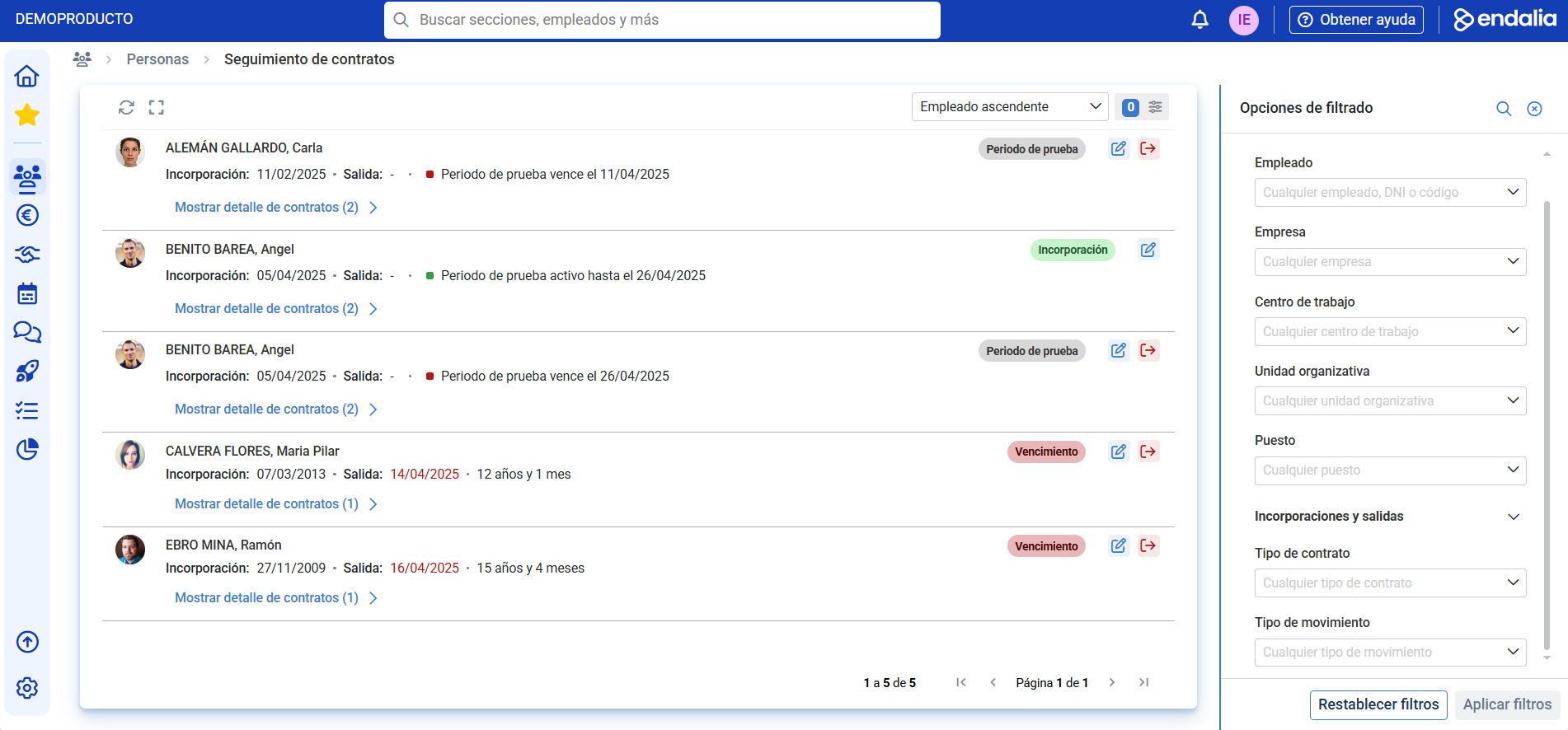
Available actions according to the contract
Depending on the status of each contract, different actions can be taken to manage and properly administer employee contracts.
- Incorporations. When a contract is in the incorporation state, it means that the employee is in the process of joining the organization. The available actions in this state are:
- Edit contracts. Access to the employee file in the contracts section, where all details related to the incorporation are found.
- End of probation period. When a contract is nearing the end of its probation period, it is a crucial moment to evaluate whether the employee will continue working in the company under the original contract terms or if changes will be made. The available actions are:
- Edit contracts. As in other states, you can access the full contract file.
- Manage employee termination. If the probation period was not satisfactory, the system allows managing the employee's termination through a streamlined termination process. This process ensures that all termination formalities are correctly fulfilled.
- Expiration. Contracts nearing expiration require attention to determine the next steps. In this state, the available actions are:
- Edit contracts. Again, you can access the employee's file to review the contract terms.
- Manage employee termination. If it is decided not to renew the contract, managing the employee's termination ensures that the entire termination process is correctly handled.
- Manage renewal (the icon is displayed in the line of the contract detail).
- Extend current contract. If the contract is nearing expiration but no extension has been made yet, the system allows managing the contract renewal through an extension, extending the existing terms for an additional agreed period.
- Manage contract transformation. If changes to the contract conditions are decided, such as transformation to indefinite or partial retirement, managing the contract's transformation through the platform is possible.
Note: It is possible to configure how many days in advance you want incorporations, probation periods, and contract expirations to appear in the tracking screen. By default, this configuration is set to show 30 days before the corresponding date.
Related articles
Want to learn more? Check out the following related articles:
If you have doubts about terms, take a look at our glossary at this link.
Was this article helpful?
That’s Great!
Thank you for your feedback
Sorry! We couldn't be helpful
Thank you for your feedback
Feedback sent
We appreciate your effort and will try to fix the article